
Track Easy
GPS Tracking App & Website for Kids


Overview
Track Easy is an app and responsive website for the parents using Track Easy GPS device designed to trace and locate whereabouts of their children while away from them. The primary users are parents of children from the age of 2 -16 years who use school busses, play outdoors with friends, go cycling/hiking or do other outdoor activities without their parent’s supervision.
I chose to create Track Easy after my friend Preeti told me as to how worried she gets about her 8 year old daughter when her babysitter takes her to various activities through the day and Preeti is not able to call the sitter from work to check.
Roles & Responsibilities
UI/UX Designer
(Case Study Project for Google UX Specialization):
User Research, Ideation, Interaction, Visual Design, Wireframing, Prototyping & Testing
Duration: 3 weeks
Tools: Figma, Google Docs, Google Slides, Google Sheets
Problem
In the United States, an estimated 1 million children are reported missing every year. It was found that if necessary action was taken within the first hour of missing, lot of children could have been saved. In majority of the cases it was too late before the parents realized that their child have gone missing.


Research
I concluded through my foundational research based on various government reports on missing and abducted children, that if there is sufficient information of the child’s travelled locations, before disappearance it would be very easy to find them.
After conducting in-person user interviews of 7 individuals with children in the age group of 2 -16 years of age, it was found that most parents felt anxious about their children’s whereabouts when they were away and didn't know how to trace them. The feedback received through research made it very clear that all parents were open to the idea of tracing their children through phone or other devices whenever and from wherever they wanted to.
User Needs & Pain Points
Based on the interviews of 7 individual users I created empathy maps in order to empathize and understand their needs and pain points.
Participant 2: Multiple Viewing
" I want a way where even my husband too can access and view the location and live tracking"
Participant 4: Emergency Button
" I am very scared of loosing my active toddler at crowded places. I need a siren button on the app to quickly locate her. "
Participant 5: Versatile
" I usually use phone app most of the time but my partner mostly uses the laptop as he works long hours"
Participant 7: Battery Indicator
" I would love to buy an app that has device battery indicator to track my teen son who loves hiking and stays over at his friend's place"
User Persona
I further defined two main user groups based on the interview insights and the user needs and pain points. This helped me empathize better with them in order to attain the goal.


User Flow
Considering the use case of making emergency calls and quick tracking I decided to take the mobile first approach. I started the process with making the user flow for the Track Easy app first and followed by responsive website.


Ideation and Paper Wireframes
I did a quick ideation exercise to come up with ideas for how to address gaps identified in the competitive audit. My focus was specifically on uninterrupted tracking of the child’s location while away from the guardian.
Wireframes
Post ideation and drafting some paper wireframes, I created the initial designs for the Track Easy app. These designs focused on delivering personalized guidance to users to help track their child.

Live Map feature for tracking the location of the child
Current location of the child with address and option for driving directions
Home Screen:

Low fi Prototype
In order to prepare for usability testing, I created a low-fidelity prototype that connected the user flow of onboarding and making an emergency call.

Wireframes: Mobile App
Post ideation and drafting some paper wireframes, I created the initial designs for the Track Easy app. These designs focused on delivering personalized guidance to users to help track their child.
Live Map feature for tracking the location of the child as the user opens the app
Current location of the child with address and option for driving directions
Home Screen: Iphone 11 Pro Max

Child's GPS Device Battery Indicator
Emergency voice call button
Parent's location
Big Map view with zoom-in and zoom-out button
Low fi Prototype
In order to prepare for usability testing, I created a low-fidelity prototype that connected the user flow of onboarding and making an emergency call.
Usability Test Parameter

Usability Test Findings
Before Usability Test

After Usability Test
Priority 1:
4 out of 5 Participants wanted a bigger view of the live map function
Priority 2:
2 out of 5 Participants wanted directions to drive to the child's location
Priority 0:
5 out of 5 Participants wanted an emergency Call button on the home page instead of the profile page
Final Design: Mockups
Based on the insights from the usability studies, I applied design changes like providing a clear call button on the home screen to make quick call.
Wireframe : Home Screen
Mockup: Home Screen


Hi Fidelity Mockups: Mobile App
Onboarding Screens

Home Screens


Notifications Screens


User Profile Screens

Responsive design
The designs for screen size variation included mobile, tablet, and desktop. I optimized the designs to fit specific user needs of each device and screen size.
Ipad pro 11' - Home Screen

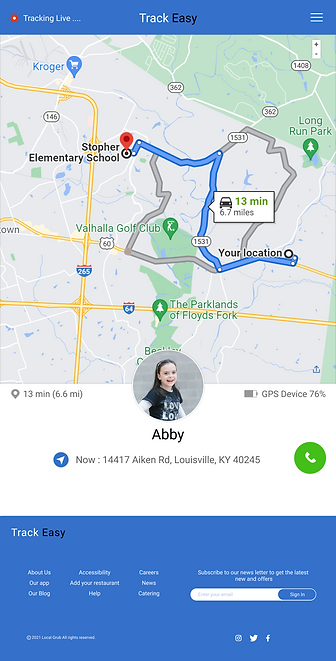
Desktop - Home Screen


Takeaways
